
SweepGlobal: Sign Up + Complete KYC
₦125.00 NGN
You Earn
13
Slots Left
20
Total Slots
1 📸
Screenshots
Job Description
1. Open the SweepGlobal link provided.
2. Sign up for a new SweepGlobal account.
3. After signing up, click “More”.
4. Go to the “Airdrop” section.
5. In the Airdrop section, find the “KYC Verification” task and complete the KYC verification with a valid ID card.
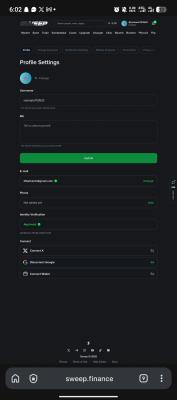
6. After completing KYC, go to Settings and check your Identity Verification/KYC status.
7. Make sure the status shows Approved.
8. Take ONE clear screenshot of the full Settings page showing your account details and successful KYC status.
9. Submit the screenshot as proof.
Proof Requirement:
Submit one full-page screenshot from Settings showing the successful KYC/Identity Verification status.
⚠️ Do not submit only your profile page. The proof must show the completed KYC status.
⚠️ Read the description FIRST before clicking
Only click when you are ready to complete the task.