
Block buster new users
⚠️ NEW USERS ONLY – DO NOT USE YOUR GEMGALA EMAIL
Blockbuster is from the same team as Gemgala but NO face verification. You must use a fresh email/Google that you have NEVER used on Gemgala before.
STEP-BY-STEP (use Chrome browser only):
1. Click my link: https://playbb.fun/u/29179041
2. Chrome will show a pop-up "Open in Play Store?" – tap CONTINUE / OPEN. If you see "Webpage not available", tap the 3 dots > Open in app.
3. Install Blockbuster – Games & Social
4. Open app → tap "Quick Login" → sign up with EMAIL or GOOGLE (must be NEW, not your Gemgala one)
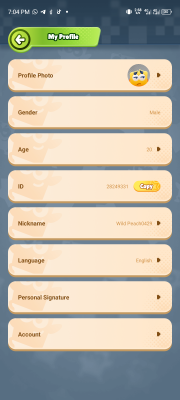
5. Complete your profile fully: set nickname, choose avatar, select Gender, Age, Region = Nigeria, Language = English
6. Wait for home screen – you will see "My Wallet" with 3,000 coins for new users
PROOF TO UPLOAD (2 screenshots, status bar must show today's date/time):
- Screenshot 1: Chrome showing my link OR the pop-up "Continue to Play Store" (proves you clicked)
- Screenshot 2: Blockbuster "My Profile" page showing your nickname, Nigeria flag, and completed profile (like the example below)
REJECT if: you used your old Gemgala email/Google, profile not completed, no date visible, cropped image, or you didn't click the link first.
NOTE: This is an AppsFlyer link – it shows a popup then opens Play Store. It does not load a normal webpage on desktop.