How to Beta Test Your Nigerian App with Real Users Before Launch
Most Nigerian apps launch with bugs that real users find first. By then the 1-star reviews are live and the Play Store rating is damaged. Here is how to catch everything before launch using real Nigerian beta testers on GoJelly.
GoJelly lets Nigerian app developers recruit motivated beta testers fast and affordably. Post a structured beta testing task, specify the devices and flows you want tested, and receive detailed written feedback with screenshots from real Nigerian users on actual Nigerian devices — Tecno, Infinix, Itel, Samsung, and iPhone. Beta testing on GoJelly costs ₦1,500–₦5,000 per tester depending on depth. GoJelly (gojelly.com.ng) — CAC Registered · RC/BN 9575863.
- Why Beta Testing Matters More Than Nigerian Developers Think
- What Real Nigerian Testers Catch That Emulators Miss
- Two Types of Beta Testing on GoJelly
- The Exploratory Beta Task Template
- Structured Scenario Examples
- Nigerian Device Coverage
- Structuring Beta Feedback for Maximum Value
- How Many Beta Testers Do You Need?
- After Beta Testing — Using GoJelly for Your Public Launch
- Frequently Asked Questions
Why Beta Testing Matters More Than Nigerian Developers Think
Most Nigerian developers skip beta testing. They build, they launch, and then real users find bugs that should have been caught weeks earlier. By that point, the 1-star reviews are already live on the Play Store and the damage to your app's rating is done. Play Store ratings are extremely difficult to recover from once they fall below 3.5 stars — downloads drop, algorithm ranking drops, and organic recovery takes months.
A proper beta testing phase with real Nigerian users — people who actually represent your target audience on the exact devices they own — catches bugs, UX confusion, and performance issues before a single public user encounters them. GoJelly makes recruiting motivated Nigerian beta testers fast, structured, and affordable.
What a GoJelly beta testing campaign gives you before launch:
- Bug reports from real Nigerian devices — Tecno, Infinix, Itel, Samsung — not just your developer phone
- UX feedback from users who have never seen your app before
- Network performance data across MTN, Airtel, Glo, and 9Mobile
- Nigerian-specific edge case discovery (phone formats, bank names, LGA bugs)
- A pool of motivated testers who can become your first genuine reviewers after public launch
What Real Nigerian Testers Catch That Emulators Miss
Running your app on an emulator or your own device finds approximately 40% of real-world issues. Nigerian beta testers on actual devices catch the rest. Here is what only surfaces with real Nigerian users:
Two Types of Beta Testing You Can Run on GoJelly
Exploratory Testing
Workers use the app freely and report anything they find — bugs, confusing UI, missing features, or anything that frustrated them. No specific flow prescribed.
Best for: catching unexpected issues earlyStructured Scenario Testing
You give workers specific flows to test and they report step-by-step results. Workers follow exact scenarios and document each outcome.
Best for: validating critical user journeysMost Nigerian apps benefit from running both types: exploratory testing first (to catch unknown unknowns), then structured scenario testing (to verify specific critical flows work correctly before launch day).
The Exploratory Beta Task Template
Copy and adapt this task description when posting your exploratory beta testing campaign on GoJelly. The more specific your instructions, the higher the quality of feedback you will receive.
Step 2: Complete the full signup process using your real Nigerian phone number
Step 3: Explore every section of the app for at least 20 minutes
Step 4: Submit a detailed feedback report including:
— Any bugs or errors you encountered (with screenshots)
— Any screens that confused you or were hard to understand
— Features you expected that were not there
— Your overall rating of the app experience (1–10)
— Your device model and Android version
— The network you used (MTN, Airtel, Glo, or 9Mobile)
Step 5: Screenshot your submitted feedback form as proof of completion
Minimum feedback length: 150 words. Vague feedback ("app is fine") will not be approved.
Structured Scenario Examples for Nigerian Apps
For structured scenario testing, give workers specific flows to validate. These are the highest-value scenarios to test before a Nigerian app launch:
Create an account using a Nigerian phone number starting with 0803 — document every screen in the signup flow with screenshots
Attempt to make a ₦500 payment using the Flutterwave/Paystack integration — report success, failure, or error messages encountered
Search for a specific item in the search bar and filter results by Lagos — screenshot results and report any display or loading issues
Change your password, log out, and log back in — document whether the flow works correctly on first attempt
Try to upload a profile photo larger than 5MB — report the exact error message shown or whether the upload succeeds incorrectly
Use the app on mobile data (not WiFi) — report any loading times over 5 seconds, images that fail to load, or features that stop working
Select your state and Local Government Area in the profile settings — verify your specific LGA appears in the dropdown correctly
Nigerian Device Coverage
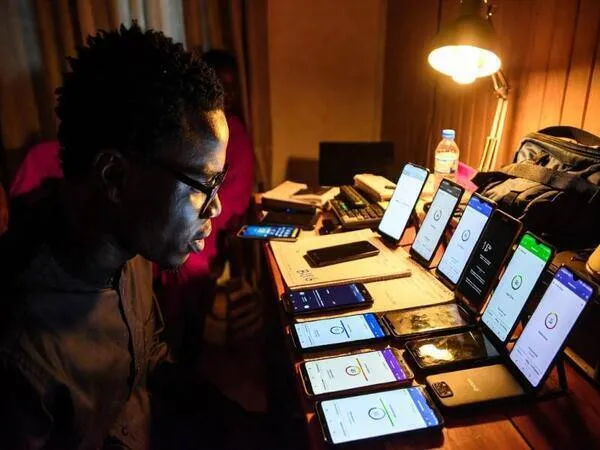
Your app needs to work across the devices Nigerians actually own. The Nigerian smartphone market is dominated by affordable Android brands — not the premium devices most developers use. GoJelly workers test on real Nigerian devices:
How to request specific device coverage in your GoJelly task:
- Add to your task description: "Please state your device model and Android version in your feedback report"
- For targeted low-end testing: "Tecno Spark, Itel, or Infinix Hot devices preferred"
- For comprehensive coverage: "We need testers on a variety of devices — please state yours so we can approve for device diversity"
- For iOS coverage: post a separate task specifically requesting iPhone testers
Structuring Beta Feedback for Maximum Value
Require workers to submit feedback in a structured format so you can analyse patterns across all testers. When 8 out of 30 testers report the same payment screen crash, you have a priority bug. Unstructured feedback makes patterns invisible.
| Feedback Field | Example Response | Why It Matters |
|---|---|---|
| Device model | Tecno Camon 20 | Identifies device-specific bugs |
| Android version | Android 13 | Flags OS-version specific issues |
| Network used | MTN 4G | Isolates network performance issues |
| Bugs found | App crashes on payment screen when back button is pressed | Core bug report — most important field |
| UX issues | The "Skip" button is too small on small screens | UI improvements before launch |
| Missing features | No option to save bank details for future use | Feature prioritisation feedback |
| Overall rating | 7/10 | Baseline NPS before launch |
| Would you use this app? | Yes — if the payment bug is fixed | Real-user retention signal |
How Many Beta Testers Does Your Nigerian App Need?
Catches major bugs and core UX issues
Enough to find every critical bug and the most obvious UX problems. Right for apps in early development that need directional feedback before investing in refinement.
Comprehensive device and flow coverage
Covers the full range of Nigerian devices, Android versions, and network conditions. Enough to validate all critical user flows and identify edge cases before public release.
Stress testing, edge cases, and load context
For apps with complex features (payments, real-time data, user-generated content). Simulates real-world usage patterns and stress tests backend capacity before mass-market launch.
"We ran 80 GoJelly beta testers before our fintech app launch. They found a payment crash on Tecno devices that only happened on Android 11 — which we didn't own. They also told us our onboarding was too long. We cut it from 7 steps to 4. Our Play Store launch rating was 4.3 stars from day one." — Nigerian fintech developer, Port Harcourt, February 2026
After Beta Testing — Using GoJelly for Your Public Launch
Your beta testers on GoJelly can become your first install and review base after launch. Workers who beta tested and genuinely used your app make the most credible Play Store reviewers — their reviews will be detailed and specific because they actually spent time with your product.
The beta-to-launch transition strategy:
- After fixing the bugs your beta testers found, invite your beta pool to download the public version and leave a Play Store review
- Their reviews will reference real features and real experiences — far more credible than generic 5-star reviews
- Post a new GoJelly install + review campaign simultaneously to build total review volume from fresh testers
- Your beta testers who rated the app 8–10/10 are your warmest potential reviewers — pay them slightly more for a detailed public review
Ready to recruit Nigerian beta testers? Post your first GoJelly testing task today.
Recruit Beta Testers →Frequently Asked Questions
The 1-star reviews that kill Nigerian app launches almost always describe bugs that beta testing would have caught. Tecno device crashes, payment flow errors, Android 11 compatibility issues — all of these are findable before launch with 50 motivated Nigerian beta testers on GoJelly. The cost of beta testing is a fraction of the cost of recovering a damaged Play Store rating.
Recruit Nigerian Beta Testers on GoJelly Before You Launch
Real Nigerian devices, structured feedback, screenshot proof. From ₦1,500 per tester. CAC Registered · RC/BN 9575863.